---
updatedAt: 2025-11-13T21:28:16.000Z
agentTools:
projectIndex: https://fp-api.readme.io/llms.txt
---
# How to build a GameFi analytics app
This tutorial will take [Planet IX](https://www.footprint.network/research/gamefi/game-protocols/single-game-stats?chain=Polygon\&series_date-79426=past90days\&protocol_name=Planet%20IX) as an example and show you how to build a GameFi analytics app step by step through the API, so let's get started.
overview
## Prerequisites
Before getting started, make sure you have the following ready:
* Node v.14+
* NPM or Yarn
* Axios
* Highcharts
## Step 1: Get the GameFi protocol statistics metrics data
Before we can get to the data, we need to know the contract addresses for Planet IX, but finding all of them is not easy in the world of blockchain.
Luckily, Footprint has designed a `protocol_slug` that works behind the scenes to help us find all the contract addresses for each project. We will have another article describing the design of `protocol_slug` and how to get it. After that, we know that Planet IX's `protocol_slug` in Footprint is `planet-ix`.
First, we might start with an overview of Planet IX, where we can use [getProtocolStatsHistory](https://fp-api.readme.io/reference/get_v3-protocol-getprotocolstatshistory) to get daily stats such as transaction volume, active users, and transaction, etc.
```javascript
const axios = require('axios')
const options = {
method: 'GET',
url: 'https://api.footprint.network/api/v3/protocol/getProtocolStatsHistory',
headers: {
accept: 'application/json',
'api-key': 'demo-api-key',
},
params: {
chain: 'Polygon',
protocol_slug: 'planet-ix',
start_time: '2023-07-01',
end_time: '2023-07-25',
},
}
axios
.request(options)
.then(function (response) {
console.log(response.data)
})
.catch(function (error) {
console.error(error)
})
```
In the response data, we will get the following daily metric data
```json
{
"message": "success",
"code": 0,
"data": [
{
"on_date": "2023-07-01",
"chain": "Polygon",
"protocol_slug": "planet-ix",
"protocol_name": "Planet IX",
"logo": "https://footprint-imgs.oss-us-east-1.aliyuncs.com/logo_images/planet-ix.png",
"number_of_active_users": 15085,
"number_of_transactions": 117500,
"volume": 34975.31395305748
},
{
"on_date": "2023-07-02",
"chain": "Polygon",
"protocol_slug": "planet-ix",
"protocol_name": "Planet IX",
"logo": "https://footprint-imgs.oss-us-east-1.aliyuncs.com/logo_images/planet-ix.png",
"number_of_active_users": 15372,
"number_of_transactions": 118143,
"volume": 136384.95365757614
},
{
"on_date": "2023-07-03",
"chain": "Polygon",
"protocol_slug": "planet-ix",
"protocol_name": "Planet IX",
"logo": "https://footprint-imgs.oss-us-east-1.aliyuncs.com/logo_images/planet-ix.png",
"number_of_active_users": 14563,
"number_of_transactions": 102406,
"volume": 69091.82447584522
},
...
]
}
```
Now we can use any chart library such as [Highcharts](https://www.highcharts.com/) to implement the front-end interface.
number\_of\_transactions
volume
## Step 2: Get the NFT latest sales
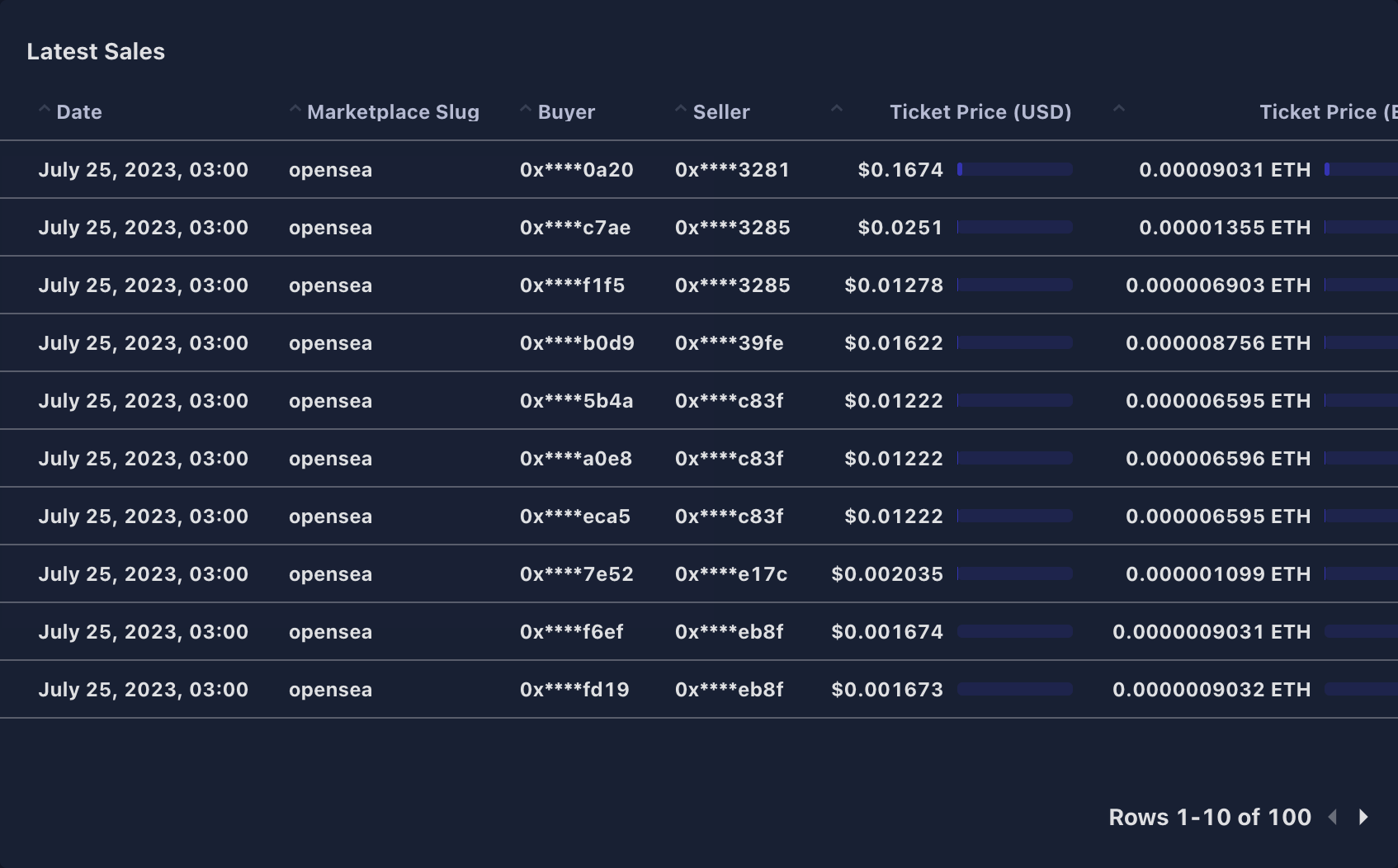
Next, we may also be concerned about the latest sales of Planet IX NFT, so let's see how we can use [getNFTTransactions](https://fp-api.readme.io/reference/get_v2-nft-collection-transactions) to do that.
From [OpenSea](https://opensea.io/collection/planet-ix-assets), we know that Planet IX's NFT contract address on Polygon is `0xba6666b118f8303f990f3519df07e160227cce87`, so let's code...
```javascript
const axios = require('axios')
const options = {
method: 'GET',
url: 'https://api.footprint.network/api/v2/nft/collection/transactions',
headers: {
accept: 'application/json',
'api-key': 'demo-api-key',
},
params: {
chain: 'Polygon',
collection_contract_address: '0xba6666b118f8303f990f3519df07e160227cce87',
},
}
axios
.request(options)
.then(function (response) {
console.log(response.data)
})
.catch(function (error) {
console.error(error)
})
```
In the response data, we will get the latest sales
```json
{
"message": "success",
"code": 0,
"data": [
{
"block_timestamp": "2023-07-24 00:00:25.000 UTC",
"collection_contract_address": "0xba6666b118f8303f990f3519df07e160227cce87",
"marketplace_slug": "opensea",
"nft_token_id": "24",
"chain": "Polygon",
"transaction_hash": "0x1be1f43c5ff4b1ad60815371b9c9bf51b26780cc941f5b1c4f7c470a9efbc309",
"block_number": 45441416,
"log_index": "285",
"internal_index": "0",
"marketplace_contract_address": "0x00000000000000adc04c56bf30ac9d3c0aaf14dc",
"eth_amount": 0.000010023808223983388,
"collection_slug": "planet-ix-assets",
"number_of_nft_token_id": 1,
"value": 0.018928076058858,
"value_currency": "USD",
"amount": 0.025,
"amount_currency": "MATIC",
"amount_currency_contract_address": "0xeeeeeeeeeeeeeeeeeeeeeeeeeeeeeeeeeeeeeeee",
"buyer_address": "0x3799dff362d4b9da0b02936b3fa46a3664796bfe",
"seller_address": "0x9eb0c5590fc8292d817337dd5e1b42fcef70d808",
"royalty_rate": 0.1,
"royalty_amount": 0.0025,
"royalty_value": 0.001892807605886,
"platform_fee_rate": 0.025,
"platform_fees_amount": 0.000625,
"platform_fees_value": 0.000473201901471,
"block_date": "2023-07-24",
"trade_type": "single"
},
{
"block_timestamp": "2023-07-24 00:01:17.000 UTC",
"collection_contract_address": "0xba6666b118f8303f990f3519df07e160227cce87",
"marketplace_slug": "opensea",
"nft_token_id": "12",
"chain": "Polygon",
"transaction_hash": "0xe62862f857bddb2892ba1fa00a6b98034e1ad122511d4d6185f9585711025f6d",
"block_number": 45441440,
"log_index": "703",
"internal_index": "0",
"marketplace_contract_address": "0x00000000000000adc04c56bf30ac9d3c0aaf14dc",
"eth_amount": 0.000013832855349096524,
"collection_slug": "planet-ix-assets",
"number_of_nft_token_id": 1,
"value": 0.026120744961223,
"value_currency": "USD",
"amount": 0.0345,
"amount_currency": "MATIC",
"amount_currency_contract_address": "0xeeeeeeeeeeeeeeeeeeeeeeeeeeeeeeeeeeeeeeee",
"buyer_address": "0x681258fbe7fe75063b3dda9a6ab60160c2e64b3c",
"seller_address": "0x09e3802405f3cec8a94d6216881c86623e163285",
"royalty_rate": 0.1,
"royalty_amount": 0.00345,
"royalty_value": 0.002612074496122,
"platform_fee_rate": 0.025,
"platform_fees_amount": 0.0008625,
"platform_fees_value": 0.000653018624031,
"block_date": "2023-07-24",
"trade_type": "single"
},
...
]
}
```
It can be displayed on the front-end as a table list.
## Step 3: Get the NFT latest transfers
In addition to sales, we can also use [getNFTTransfers](https://fp-api.readme.io/reference/get_v2-nft-collection-transfers) to get the latest transfers of Planet IX NFT.
```javascript
const axios = require('axios')
const options = {
method: 'GET',
url: 'https://api.footprint.network/api/v2/nft/collection/transfers',
headers: {
accept: 'application/json',
'api-key': 'demo-api-key',
},
params: {
chain: 'Polygon',
collection_contract_address: '0xba6666b118f8303f990f3519df07e160227cce87',
},
}
axios
.request(options)
.then(function (response) {
console.log(response.data)
})
.catch(function (error) {
console.error(error)
})
```
In the response data, we will get the latest transfers
```json
{
"message": "success",
"code": 0,
"data": [
{
"block_timestamp": "2023-07-24 00:00:01.000 UTC",
"collection_contract_address": "0xba6666b118f8303f990f3519df07e160227cce87",
"chain": "Polygon",
"transaction_hash": "0x545a509a764dd01e1084c5cef58f4984e327819b6ec8d12577a2cb95d83f0741",
"log_index": "155",
"nft_token_id": "14",
"internal_index": "0",
"block_date": "2023-07-24",
"block_number": 45441405,
"from_address": "0x0000000000000000000000000000000000000000",
"to_address": "0x558fe2fd528e8ee0708cbea887f140a106e18e4d",
"amount_raw": 1,
"transfer_type": "mint"
},
{
"block_timestamp": "2023-07-24 00:00:01.000 UTC",
"collection_contract_address": "0xba6666b118f8303f990f3519df07e160227cce87",
"chain": "Polygon",
"transaction_hash": "0xe3d794a981e73d03ab50f1982bac230c4890be48c3c792058799adde67dea8b4",
"log_index": "160",
"nft_token_id": "8",
"internal_index": "0",
"block_date": "2023-07-24",
"block_number": 45441405,
"from_address": "0x75775da8c1349f7c700997740c99b72e066e4aed",
"to_address": "0x43c6e7aaf2c12a7aa60c233e0b3a08aa1ab39820",
"amount_raw": 3000,
"transfer_type": "transfer"
},
...
]
}
```
We can either show the latest transfers on the front-end like in step 2, or we can fetch all the transfers and calculate the top minters, which might be more useful for the user.
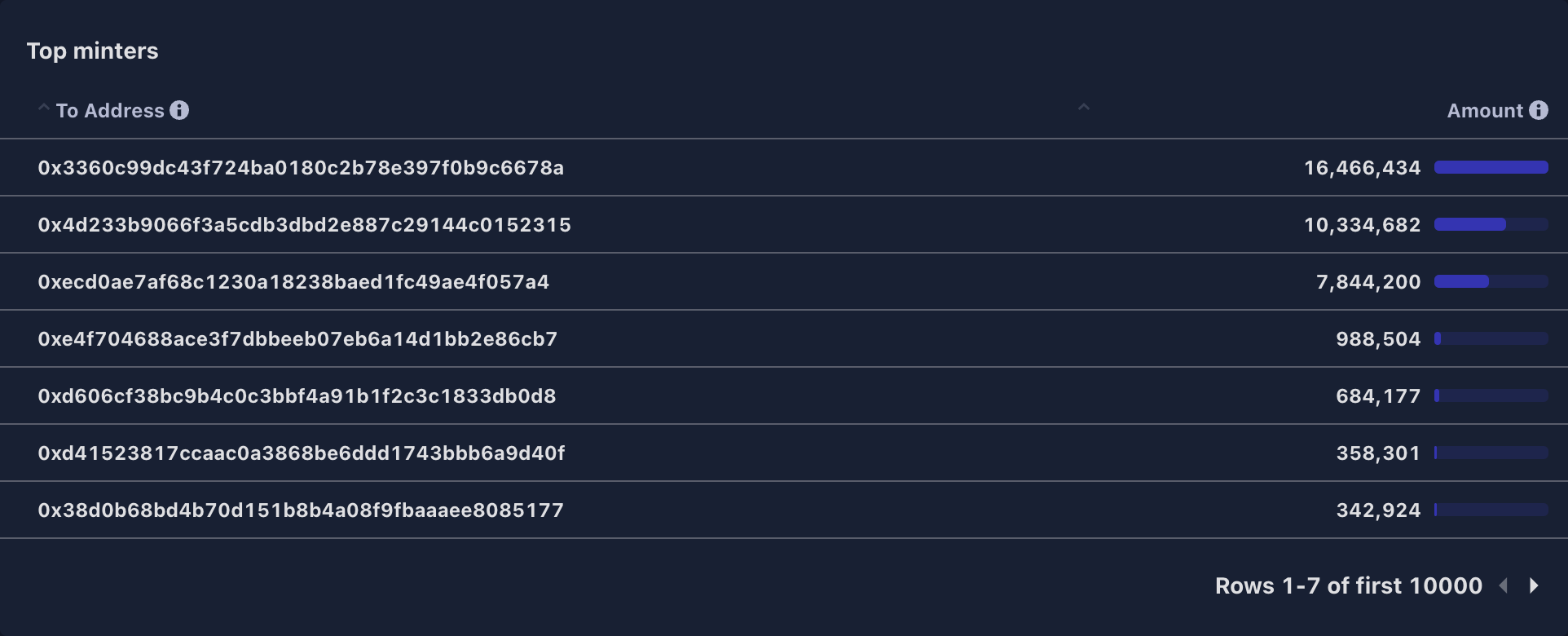
In the end, we ended up with a simple GameFi analytics app, made up of a couple of cool charts and data from the Footprint Data API.
## API Reference
If you want to know more details on the endpoint and optional parameters, check out:
* [getProtocolStatsHistory](https://fp-api.readme.io/reference/get_v3-protocol-getprotocolstatshistory)
* [getNFTTransactions](https://fp-api.readme.io/reference/get_v2-nft-collection-transactions)
* [getNFTTransfers](https://fp-api.readme.io/reference/get_v2-nft-collection-transfers)