---
updatedAt: 2025-11-13T21:29:01.000Z
agentTools:
projectIndex: https://fp-api.readme.io/llms.txt
---
# Python
## How to get project id and token
Please [contact us](https://forms.gle/Xs8WahhYh26xKoDj7).
## Usage
### Install Footprint SDK
Footprint analytics SDK requires python 3.6 above and lower than python 4.
```shell
pip install footprint-analytics
```
### Simple Demo
```python
import time
import logging
from fga import FGA, User, Event, Account, Config
logger=logging.getLogger('fga')
logger.setLevel(logging.DEBUG)
ch = logging.StreamHandler()
ch.setLevel(logging.INFO)
logger.addHandler(ch)
client = FGA(
token='xxxxxxxx',
project_id=2,
configuration=Config(logger=logger)
)
user = User(
user_id='sdk_user_id_2',
user_name='sdk_user_name_2',
sign_up_at=int(time.time())
)
event = Event(
event_type='login',
event_name='login',
user_id='sdk_user_id_2',
event_id='sdk_event_id_2',
)
account = Account(
user_id='sdk_user_id_2',
wallet_address='0x1234567890'
)
if __name__ == '__main__':
client.track(event)
client.user_set(user)
client.account_set(account)
```
### Initialize SDK
You must initialize the SDK before any events are instrumented. The token for your Footprint project is required. You can also pass a config object in this call. You can use the SDK client instance across requests after it's initialized.
```python
from fga import FGA
client = FGA(
token=FOOTPRINT_PROJECT_TOKEN,
project_id=1
)
```
### Configuration
| Name | Field Type | Description | Requirement | Default Value |
| ----------------------- | :--------- | :------------------------------------------------------------------------------------------------------------------------------------------------------- | ----------- | ------------- |
| `token` | `String` | The token of the Footprint project. Events sent by the client instance are in this project. Set when you initialize the client instance. | `Required` | `None` |
| `project_id` | `Integer` | The id of the Footprint project. | `Required` | `None` |
| `flush_queue_size` | `Integer` | Events wait in the buffer and are sent in a batch. The buffer is flushed when the number of events reaches `flush_queue_size`. | `Optional` | `200` |
| `flush_interval_millis` | `Integer` | Events wait in the buffer and are sent in a batch. The buffer is flushed every `flush_interval_millis` milliseconds. | `Optional` | `1 seconds` |
| `flush_max_retries` | `Integer` | The number of times the client retries an event when the request returns an error. | `Optional` | `12` |
| `callback` | `Function` | Client level callback function. Takes three parameters: 1. event: Event instance 2. code: integer of HTTP response code 3. message: a string message. | `Optional` | `None` |
| `opt_out` | `Boolean` | Opt out option. If set to `True`, client doesn't process and send events. | `Optional` | `False` |
```python
from fga import FGA
from fga.config import Config
def callback_func(event, code, message=None):
# callback function that takes three input parameters
# event: the event that triggered this callback
# code: status code of request response
# message: a optional string message for more detailed information
config = Config(
flush_queue_size=10,
fulush_interval_millis=1,
flush_max_retries=1,
callback=callback_func,
opt_out=True
)
client = FGA(
token=FOOTPRINT_PROJECT_TOKEN,
project_id=1,
configuration=config
)
```
### Set User Properties
User properties help you understand your users at the time they performed some action within your app such as their device details, their preferences, or language.
#### Set user properties
The user object provides controls over setting user properties. An user object must first be instantiated, then `user_set` methods can be called on it, and finally the client makes a call with the user object.
```python
from fga import FGA, User
client = FGA(
token=FOOTPRINT_PROJECT_TOKEN,
project_id=1
)
user = User(
user_id="USER_ID",
user_name="USER_NAME",
sign_up_at=int(time.time())
)
client.user_set(user)
```
| Name | Field Type | Description | Requirement | Default Value |
| -------------------------------- | :--------- | ---------------------------------------------------------------------------------------------------------------------------------------------------------------------------------------------------------- | :---------- | ------------- |
| `user_id` | `String` | Unique user identifier. | `Required` | `None` |
| `user_name` | `String` | The original name from source data. | `Required` | `None` |
| `sign_up_at` | `Integer` | The date of user sign up. Eg:`1718296406`. | `Required` | `None` |
| `user_properties` | `Dict` | You can put all the other properties of the user in the `user_properties` field to customize the analytics, due to this field will be standardized to the `extra_data` field on the standard table `user`. | `Optional` | `None` |
| `user_properties.sign_up_device` | `String` | The device used for sign up. This field is automatically normalized to the table. | `Optional` | `None` |
| `user_properties.acount_type` | `String` | The type of account. such as google, apple, email. This field is automatically normalized to the table. | `Optional` | `None` |
| `user_properties.idfa` | `String` | Identifier for Advertisers. This field is automatically normalized to the table. | `Optional` | `None` |
| `user_properties.udid` | `String` | Universal Device Identifier. This field is automatically normalized to the table. | `Optional` | `None` |
| `user_properties.country` | `String` | Standard ISO 3166-3. This field is automatically normalized to the table. | `Optional` | `None` |
| `user_properties.email` | `String` | The email address of user. This field is automatically normalized to the table. | `Optional` | `None` |
| `user_properties.ip` | `String` | The ip address of user. This field is automatically normalized to the table. | `Optional` | `None` |
| `user_properties.twitter` | `String` | The twitter account of user. This field is automatically normalized to the table. | `Optional` | `None` |
| `user_properties.discord` | `String` | The discord account of user. This field is automatically normalized to the table. | `Optional` | `None` |
### Track User Event
Events represent how users interact with your application. For example, `login` may be an action you want to note.
#### Event Properties
| Name | Field Type | Description | Requirement | Default Value |
| ------------------------------- | :--------- | --------------------------------------------------------------------------------------------------------------------------------------------------------------------------------------------------------------------------------------- | :---------- | ------------- |
| `event_id` | `String` | Unique event identifier. | `Required` | `None` |
| `user_id` | `String` | Unique user identifier. | `Required` | `None` |
| `event_type` | `String` | The type of event. The standard events mainly include:`install`, `sign_up`, `login`, `open_app`,`play_game`,`reward` and these type will be showed on standard dashboard. You can custom event type, but no show on standard dashboard. | `Required` | `None` |
| `event_name` | `String` | The name of event. | `Required` | `None` |
| `event_properties` | `Dict` | You can put all the other properties of the event in the `event_properties` field to customize the analytics, due to this field will be standardized to the `extra_data` field on the standard table `user_event`. | `Optional` | `None` |
| `time` | `Integer` | The time of event occurs, Eg:`1718296406`. | `Optional` | `time.time()` |
| `event_properties.device_id` | `String` | The name is the original event from source data. This field is automatically normalized to the table. | `Optional` | `None` |
| `event_properties.event_device` | `String` | The device used for the event. Enum: `website`, `android`, `ios`. This field is automatically normalized to the table. | `Optional` | `None` |
| `event_properties.event_source` | `String` | The source of event. Enum: `web2`, `web3` | `Optional` | `web2` |
```python
from fga import FGA, Event
client = FGA(
token=FOOTPRINT_PROJECT_TOKEN,
project_id=1
)
# Track events with optional properties
client.track(
Event(
event_id="sdk_event_id_1",
event_type="login",
user_id="sdk_user_id_1",
event_name="login"
)
)
```
### Set Account Mapping
Account mapping represent need to combine web3 data to analyze certain user behaviors, need a mapping relationship between `wallet_address` and `user_id`.
#### User Properties
| Name | Field Type | Description | Requirement | Default Value |
| ---------------------------------- | :--------- | ----------------------------------------------------------------------------------------------------------------------------------------------------------------------------------------------------------------------- | :---------- | ------------- |
| `wallet_address` | `String` | The address of web3 account. | `Required` | `None` |
| `user_id` | `String` | Unique user identifier. | `Required` | `None` |
| `user_properties` | `Dict` | You can put all the other properties of the event in the `event_properties` field to customize the analytics, due to this field will be standardized to the `extra_data` field on the standard table `account_mapping`. | `Optional` | `None` |
| `user_properties.wallet_type` | `String` | The type of wallet. The standard wallet mainly include:`EoA`, `MPC`, `AA`, `Non Custodial`,`Custodial`. This field is automatically normalized to the table. | `Optional` | `EoA` |
| `user_properties.wallet_source` | `String` | The source of wallet. The standard wallet mainly include:`signup`, `public`, `giveaway`. This field is automatically normalized to the table. | `Optional` | `signup` |
| `user_properties.wallet_provider` | `String` | The provider of wallet. The standard wallet mainly include:`metamask`, `W3A`, `OKX`, `Halo`. This field is automatically normalized to the table. | `Optional` | `metamask` |
| `user_properties.login_method` | `String` | The method of account login. The standard wallet mainly include: `google`, `twitter`, `discord`, `wallet-connect-v2`, `facebook`, `wallet-connect-v1`. This field is automatically normalized to the table. | `Optional` | `None` |
| `user_properties.chain` | `String` | Blockchain network, enum: `Ethereum`,` BNB Chain`, `Polygon`. This field is automatically normalized to the table. | `Optional` | `None` |
| `user_properties.ecosystem_id` | `String` | If you need to analyze the behavior of the same user in different projects, you need to populate this field. This field is automatically normalized to the table. | `Optional` | `None` |
| `user_properties.wallet_linked_at` | `Date` | The time of web3 account be linked for web2 account. The format is `%Y-%m-%d %H:%M:%S`. This field is automatically normalized to the table. | `Optional` | `None` |
```python
from fga import FGA, Account
client = FGA(
token=FOOTPRINT_PROJECT_TOKEN,
project_id=1
)
account = Account(
user_id='sdk_user_id_2',
wallet_address='0x1234567890'
)
client.account_set(account)
```
## View Data From SDK
Generally, after successful uploading, you will see the corresponding data within 1min.
### [User Dashboard](https://www.footprint.network/fga/game/project/Gaming%20Demo%20Project/acquisition_users?project_id=2)
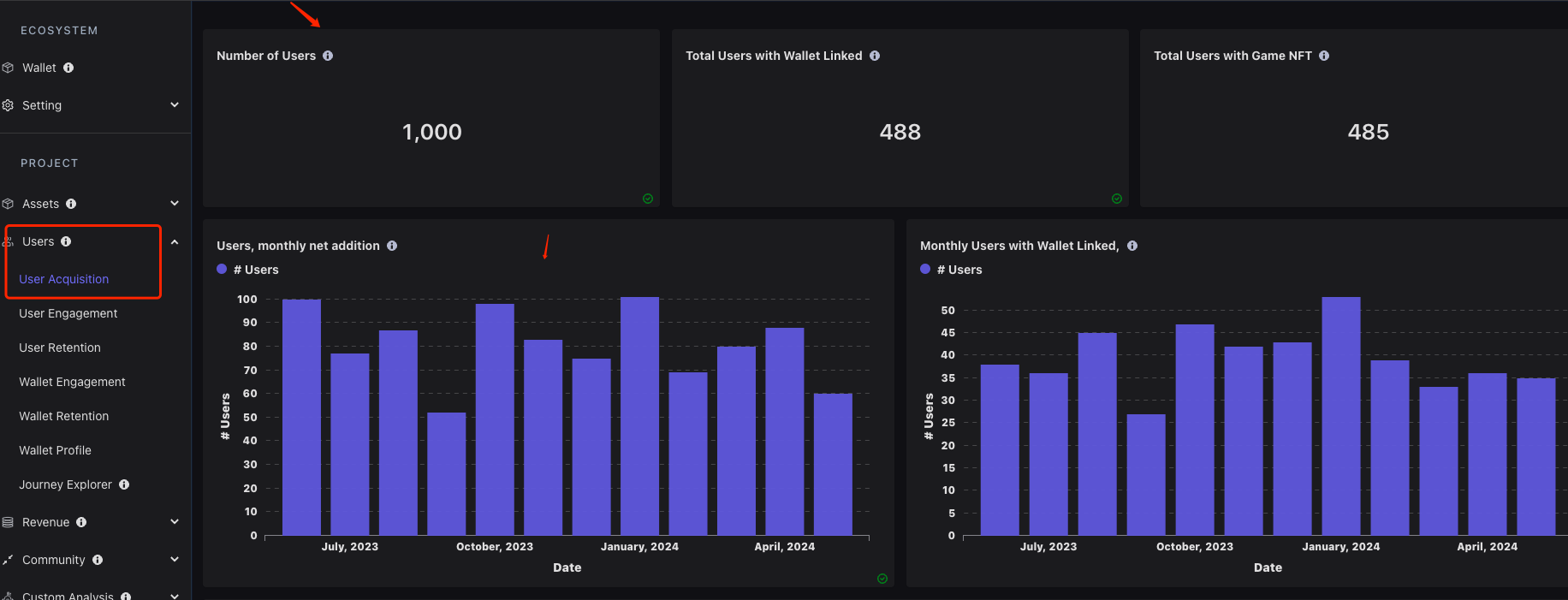
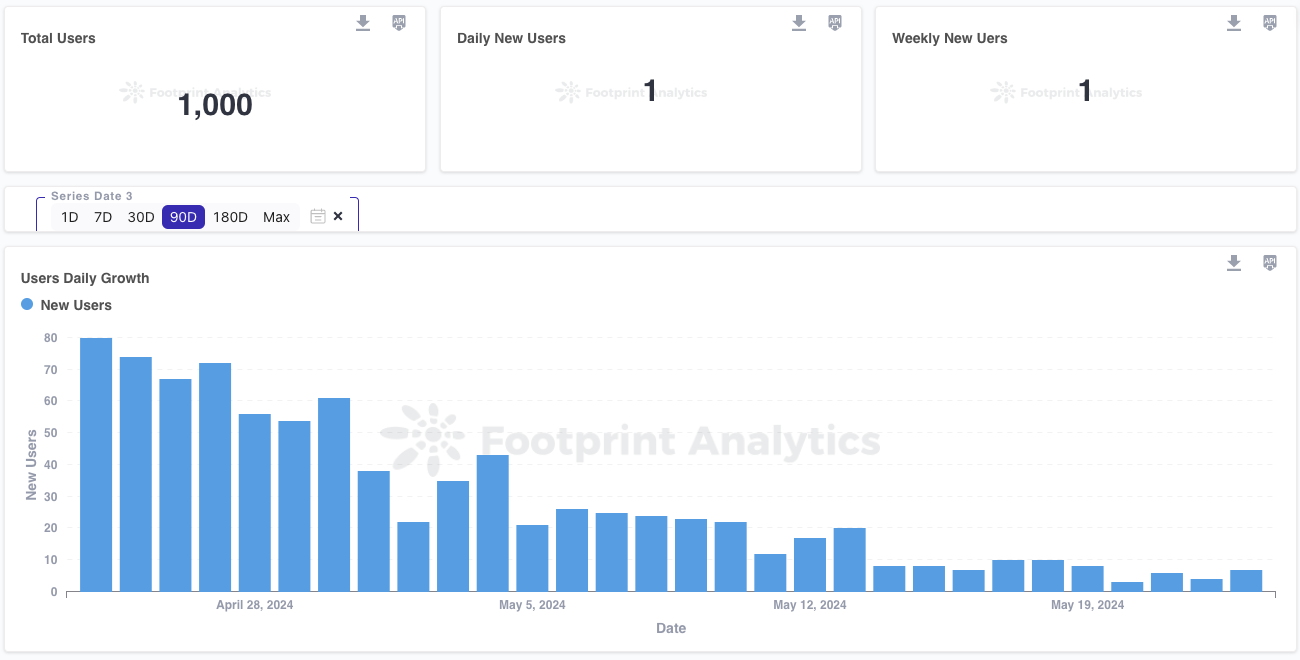
You can login `Footprint Growth Analytics` page, and click `Users` -> `Users Acquistion`, the `Number of Users` of this dashboard can show the changes if you set user. See screenshot as follow:
### [Event Dashboard](https://www.footprint.network/fga/game/project/Gaming%20Demo%20Project/gaming_engagement?project_id=2\&series_date-96483=past90days~)
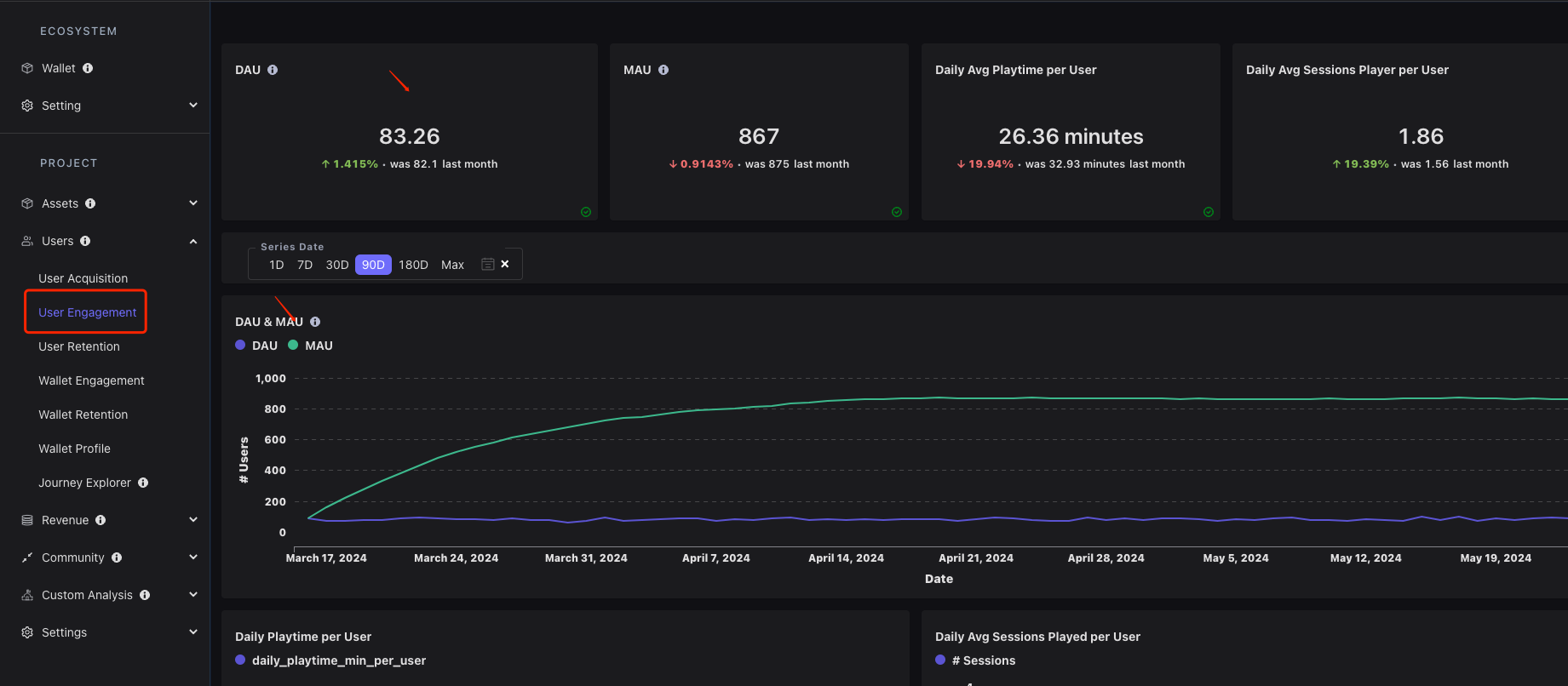
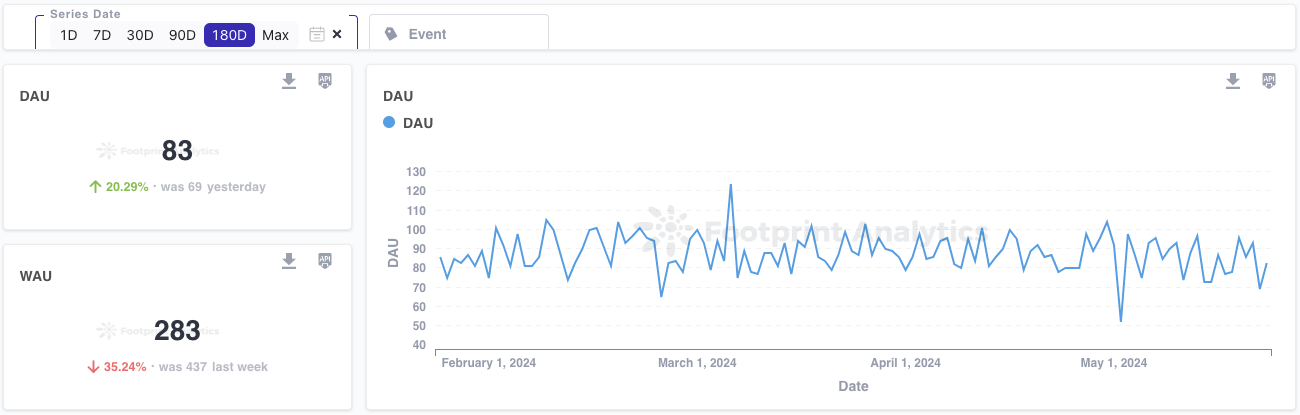
Click the `User Engagement` menu. The `DAU` metric of this dashboard can show the changes if you track event. See screenshot as follow:
### Custom Analysis
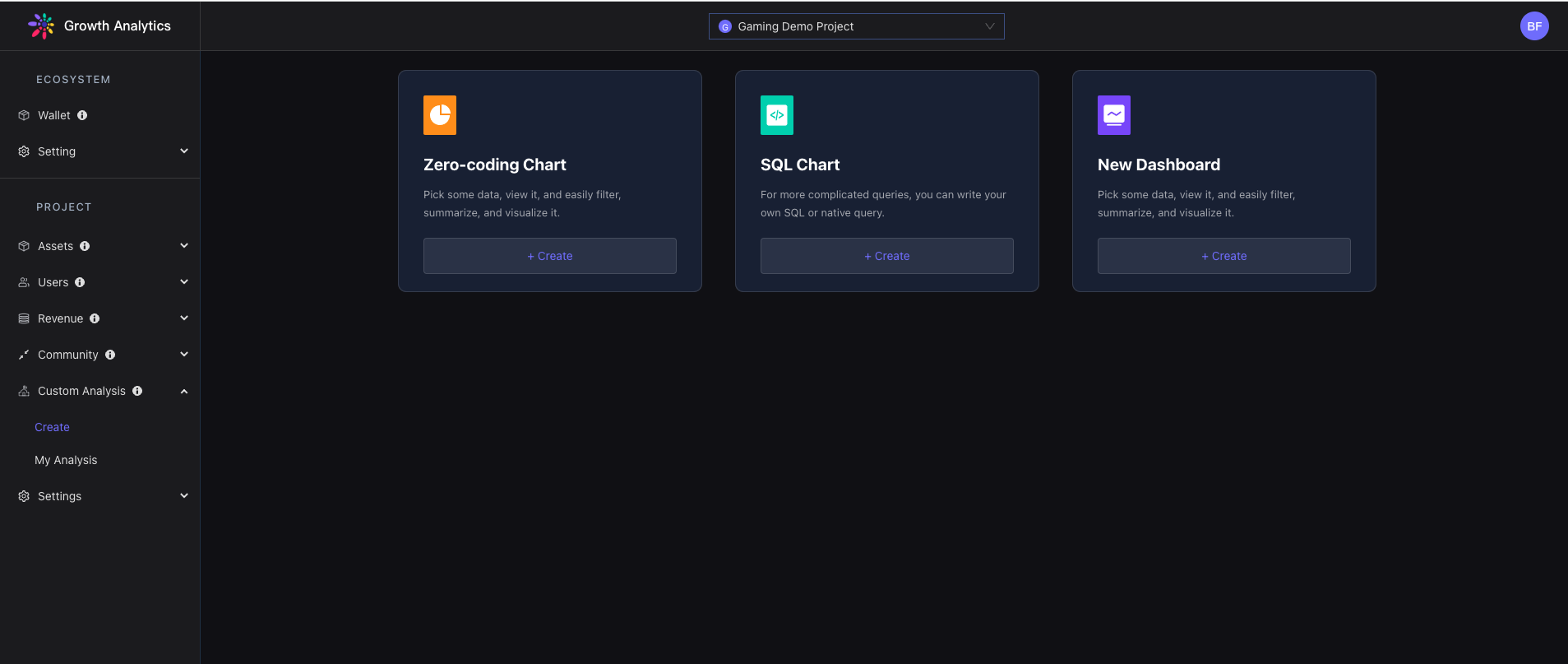
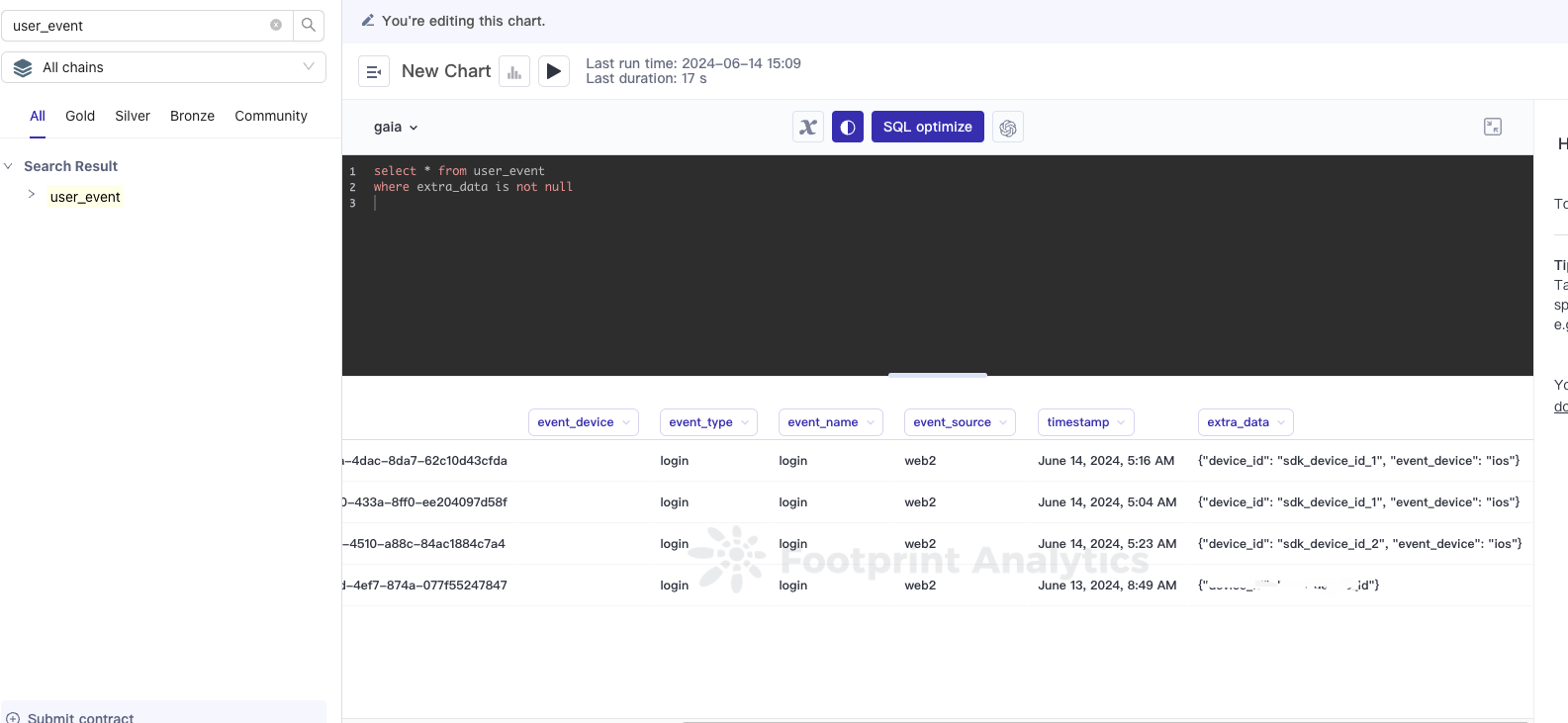
Entering `Custom Analysis` page, directly use the `user` and `user_event` table to do some custom analytics. And these standard tables have a field `extra_data` that stored the `event_properties` and `user_properties` from SDK.
## SDK Event Analytics Demo
### User Growth Analysis Scenario
This scenario involves analyzing the increase in the number of users of a service or application over different periods.
### Event Analysis Scenario
This scenario involves analyzing user interactions with a service or application by tracking various events.

### Traffic Analysis Scenario
This scenario involves analyzing the volume of visits to a particular service or application over different periods.
### User Retention Scenarios
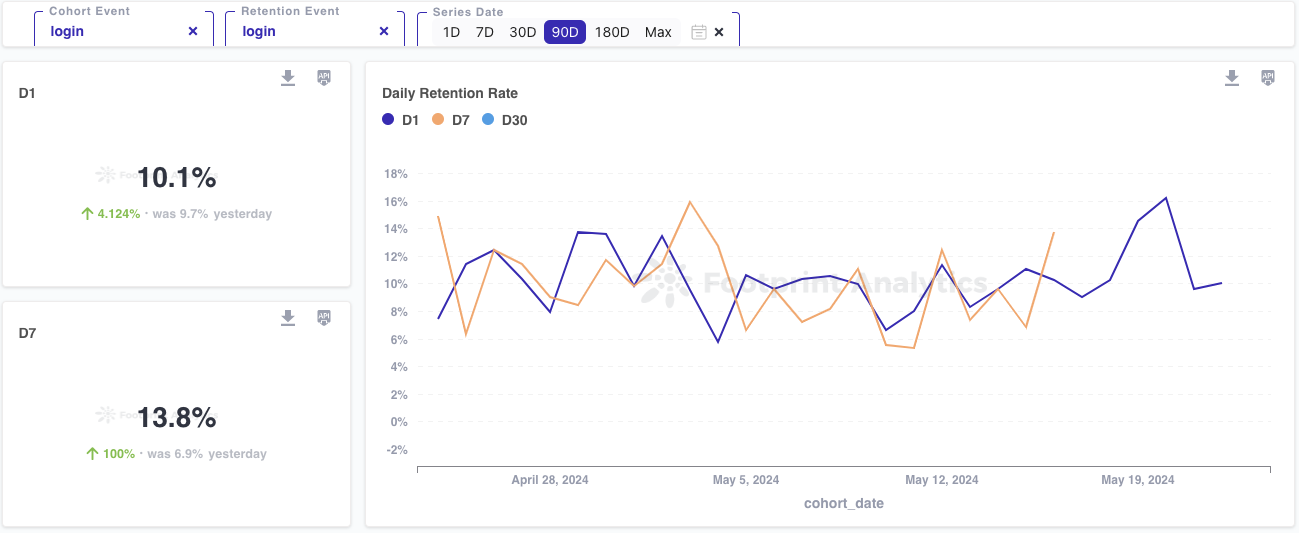
This scenario involves analyzing the percentage of users who return to a service or application after their initial visit over various time periods.